
Posts Tagged ‘Workflow’

Video Editing Storage Solutions
In this post we examine several popular video editing storage solutions and determine the best for professional use.

3 Free Video Editing Applications
Professional video editing tools at a price everybody can afford – free.
Premiere Pro: Subclips and Nesting
Maximize your Premiere Pro video editing workflow with subclips and nesting.
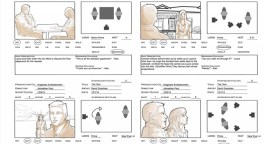
Storyboarding Your Film: Tips for Your Next Project
Before you hit ‘record’ spend time developing your film’s story through storyboarding. In this post we share a few tips and examples for successful storyboarding.

Free Webinar: Post-Production Workflows in 6K
PVC to host a Free Webinar on Post-Production 6K Workflows.
Creating Compound Clips in FCPX
Compound clips are a quick way to organize your projects in FCPX. Learn how to make them in this exclusive video tutorial.

Dream Camera Loadouts: RED Digital Cinema
We rundown three RED Camera load-out options for filmmakers with any budget.
Video Editing Workflows: Premiere Pro and RED Footage
Bringing your RED footage into Premiere Pro? Follow these tips for success.
Basic to Advanced: Resolve’s ‘Deliver’ Window Demystified
Better control your project’s workflow and delivery by tweaking the options available in Resolve’s ‘Deliver’ window.

How To Get The Most From Your Mac Pro
Are you a video editor with a Mac Pro? Check out these great resources to make sure you’re getting the most from it.

Cinema 4D: The Iris – VFX/Mograph Experiment
Maximize basic geometry from Cinema 4D with plug-ins from After Effects.

The New and Improved NUKE
NUKE 9 is on its way this fall and The Foundry is giving a sneak peek at what’s to come.