

Lewis McGregor
First-Time Filmmakers: Finding No-Budget Locations for Your Production
Your location can make or break your film project. Here’s how to find the perfect spot to shoot when you don’t have a budget.

First-Time Filmmakers: How Do You Build a Cast Without a Budget?
Getting started in filmmaking isn’t cheap, so what can you do when you need actors, but you don’t have the budget for them?
Review: DaVinci Resolve 16’s Cut Page — Is It Any Good?
If you’re an editor on the move, DaVinci Resolve 16’s new Cut Page can really improve your workflow. But if you’re not, then maybe not.
DaVinci Resolve’s New Object Removal Tool — Is It Any Good?
Does the new Object Removal Tool in DaVinci Resolve 16 stand up to Adobe’s Content Aware Fill? Here’s what you need to know.

Filmmaking Fads and Trends: Don’t Let Them Bother You
Filmmaking fads come and go, but that’s no reason why up-and-coming filmmakers shouldn’t experiment with the trend du jour.
A Rundown Of The Edit Page Changes in DaVinci Resolve 16
In this roundup, we go over all of the updates to the Edit Page in DaVinci Resolve 16 — and what they mean for your projects.
How to Upload to YouTube Directly from DaVinci Resolve 16
Blackmagic is bringing DaVinci Resolve to online content creation with simplified interfaces and direct upload to YouTube and Vimeo.
How to Get The Best Results When Filming In Natural Fog
There are a few tricks to filming in natural fog. Here’s what you need to know to protect your gear and get the shot you want.
NAB 2019: DaVinci Resolve 16 — What’s New and Updated
Blackmagic Design has announced DaVinci Resolve 16 at NAB 2019. And once again, this update is full of useful features you need to unpack.
Post-Production Tips: Using a LUT at the Beginning of a Node Tree
These techniques explore the workflow benefits of working with a LUT at the beginning of your node graph rather than at the end.
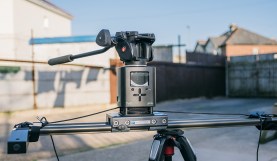
Hands-on Review: Is Syrp’s Genie the Lone Filmmaker’s Ultimate Tool?
Solo filmmakers need reliable equipment that is compact, light, easy to set up, and easy to operate. So does Syrp’s Genie pass this test?

How to Create a Mid-’90s DV Camcorder Look in After Effects
Need that DV look for your ’90s-era project? Here’s how you can turn back the clock on your footage in Adobe After Effects